
What product workflows look like when code is cheap
 Emma BurrowsJuly 8, 20264 min read
The agile vs waterfall debate is, more or less, a cost exercise.
Waterfall tries to stop costs from creeping in by nailing down requirements from the start. It assumes that changing course halfway through a project leads to the biggest financial losses, so it prevents that by front-loading research and planning. Waterfall has been a good choice for highly regulated products, or ones with a lot of dependencies across multiple teams, and it lets teams lock in budgets in advance with a fixed cost and timeline.
Agile, on the other hand, assumes the biggest financial risk is spending months building a product only to discover nobody uses it. Agile teams accept a bit of upfront budget uncertainty and invest instead in moving fast and course-correcting early.
In either case, keeping costs to a minimum has been the biggest driver of how teams set up their ceremonies and workflows. Cost has defined how teams bring ideas to the table, validate them against users, and ultimately build them out — and a huge part of that cost was the cost of code. Coding agents have slashed that, and in doing so, upended almost every workflow that was built around it.
The new shape of a product workflow
Now that you can feasibly build almost anything in a relatively short amount of time, what does the best workflow look like for getting delightful products out into the world? It's something we've been thinking about a lot, and while it's very much an evolving space, we think the new product workflow looks something like this:
→ Prototype
→ Show internally
→ Prototype again
→ Show externally
→ Capture edge cases and requirements a prototype can't surface
→ Build the real thing
Ultimately, as a product builder, you're trying to sift through the noise and pull together enough signal that you can confidently say: "yes, this solves the user's pain point in a way they find intuitive — and ideally, delightful." Prototyping lets you communicate your UX in a way that words or mockups can't, so getting prototypes and real features in front of your users as early as you can, and iterating from what you learn, helps you both move fast and build things your customers actually want.
Nailing your feedback loops is what helps you decrease noise and increase signal
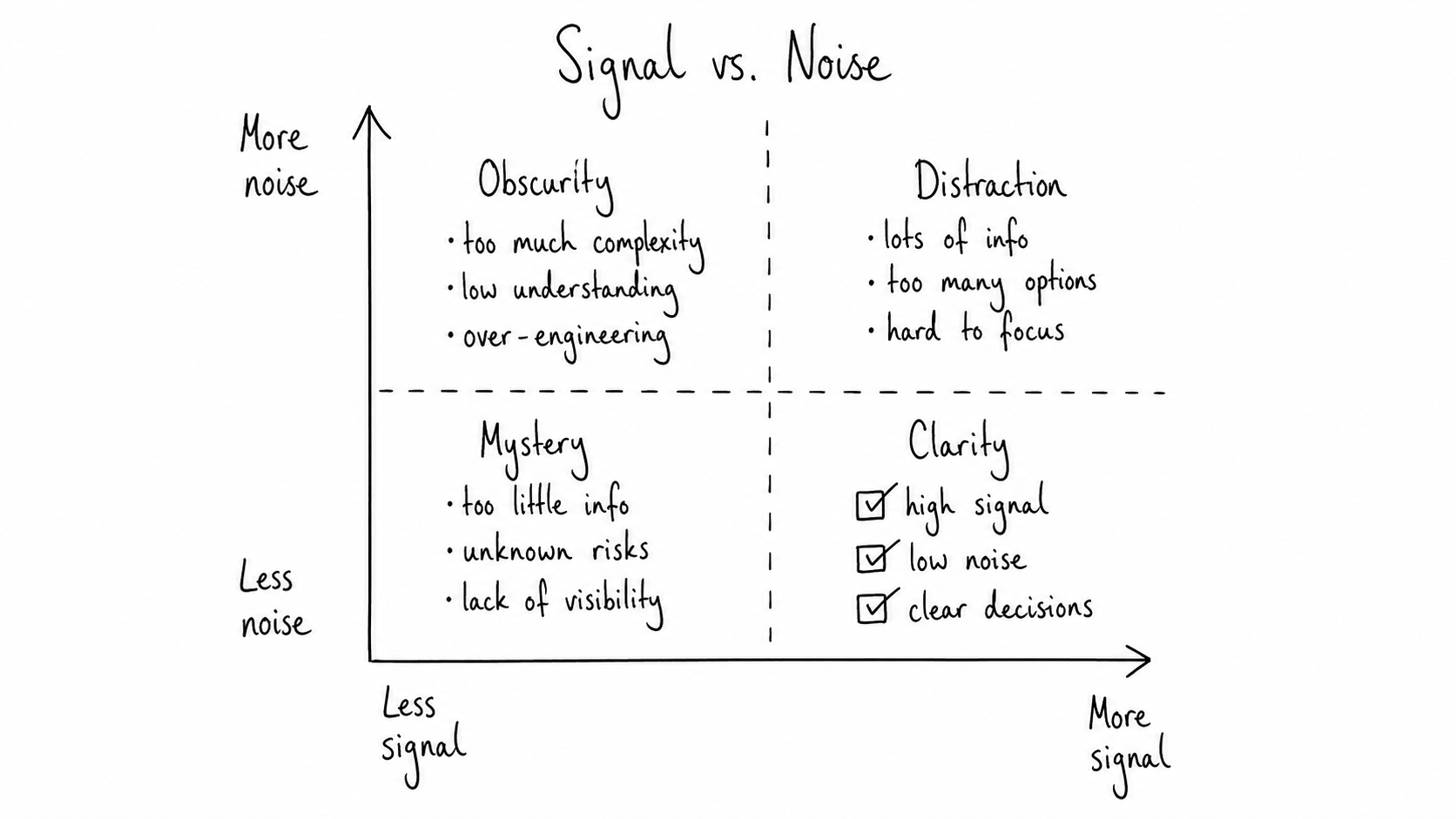
Every product team is sitting on tons of signal it can use: user interviews, support tickets, Slack messages, usage data, sales conversations. One of the most important skills of a product builder is figuring out which signals are worth paying attention to, and which are just noise.
Feedback loops — where you collect data, analyse it, act on it, and iterate — are your best friend here. They're how you decrease noise, increase signal, and move your ideas down and to the right of the signal vs noise matrix.
We think the shape of a useful feedback loop tends to look something like this:
-
Prototype, show it internally: here, you're trying to figure out if it would make sense to a proxy of your users. You'll catch any obvious UI confusion and streamline the UX.
-
Prototype, show it externally: next step is to show your prototype to your most engaged external users to find out whether it's solving an actual pain point. How you're able to do this will depend a lot on whether you're a sales-led team (where you'd show your clients) or product-led team (where you'd normally have a group of people in your user research list).
-
Shipped test: more and more teams are shipping a feature before it's fully finished now, because live usage tells you things you can't get any other way. This is usually done behind a feature flag to learn from a subset of your users, before releasing more widely.
-
Build the full feature: By now, you should have enough signal to validate your idea. If it's looking positive, this is where you ship the full feature company-wide, iterating from there and gathering usage data which will inform your next move.
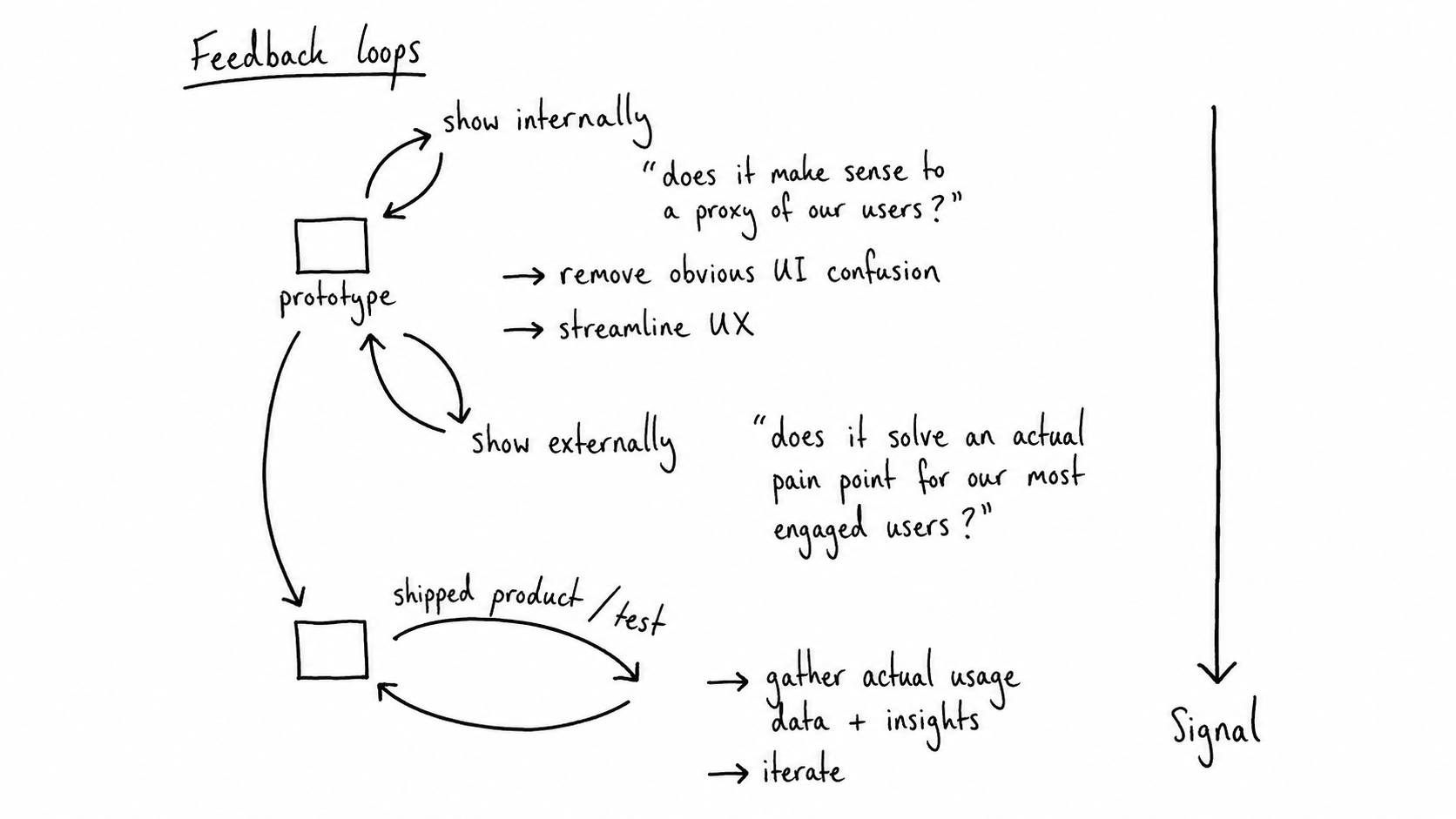
The movement between those stages isn't always linear — you'll sometimes loop back, and discard things you thought you were sure about. The goal is always to stay close enough to your users that you're truly building for them: moving from what you think they want, to what some of them say they want, to what their behaviour reveals they actually want.
Rezonant is built for this loop
Moving from prototype to internal review to external demo to shipped feature usually means the context (why you built it, what feedback came back, and what changed as a result) gets lost somewhere between tools. Rezonant is the collaborative workspace where AI-native teams run that whole loop: it carries context from your codebase and the tools where product knowledge already lives, so nothing gets rewritten from scratch at each stage.